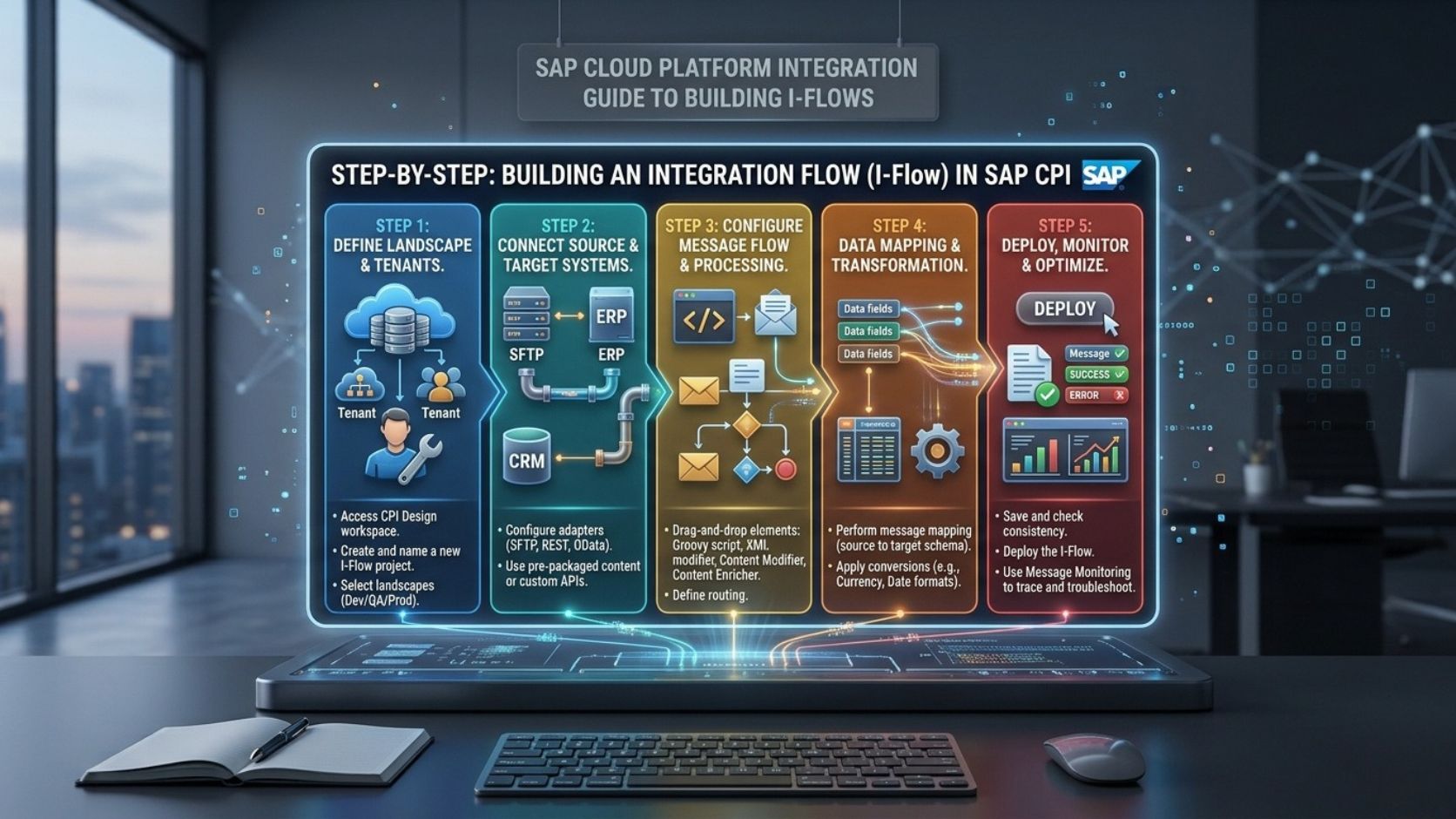
SAP Cloud Platform Integration provides a cloud-based environment for connecting SAP applications, non-SAP systems, APIs, databases, and external business platforms. Integration flows are the main building blocks used to define how information moves between these systems.
SAP Cloud Platform Integration is commonly called SAP CPI. The capability is now part of SAP Integration Suite and is generally referred to as Cloud Integration. An integration flow can receive a message, transform its data, apply business logic, route the message, and deliver it to a target system.
For beginners, understanding how to build an integration flow requires knowledge of sender and receiver systems, adapters, message mapping, content modification, routing, security, deployment, testing, and monitoring. Destinations can also be relevant when applications need centrally configured connection information.
What Is an Integration Flow?
An integration flow, commonly called an iFlow, defines how a message travels between systems.
A basic integration flow contains a sender, processing logic, and receiver.
Sender System → Integration Flow → Receiver System
For example, an e-commerce application can send an order to SAP Cloud Platform Integration. The integration flow can receive the order through an HTTP interface, validate the data, transform the message, and send the processed order to SAP S/4HANA.
An integration flow can contain several processing steps. The exact design depends on the business process and technical requirements.
How SAP Cloud Platform Integration Works
SAP Cloud Platform Integration processes messages through a runtime environment.
The sender system starts the communication. A sender adapter receives the message. The integration flow then processes the message using configured components.
Processing may include data transformation, message mapping, filtering, routing, validation, or scripting.
The receiver adapter then sends the processed message to the target system.
A typical flow can look like:
Source → Sender Adapter → Mapping → Router → Receiver Adapter → Target
This structure allows different systems to communicate even when they use different data formats or protocols.
What You Need Before Building an Integration Flow
Before creating an integration flow, the source and target systems should be clearly identified.
You should know the communication protocol supported by each system. This may be HTTP, REST, SOAP, SFTP, OData, IDoc, or another supported technology.
The source and target data structures should also be available. This is important when message mapping is required.
Authentication information must also be configured securely.
For API-based integrations, the endpoint, HTTP method, request structure, response structure, and authentication method should be known before development begins.
A clear technical design reduces errors during implementation.
Step 1: Define the Integration Requirement
The first step is to define what information needs to move between the systems.
For example, consider a customer synchronization scenario between SAP S/4HANA and a CRM application.
The requirement may be:
SAP S/4HANA → Customer Data → CRM Platform
The design should identify which fields are required.
For example:
Customer ID
Customer Name
Email Address
Phone Number
Country
The integration should also define whether the process is synchronous, asynchronous, scheduled, or event-driven.
The expected message volume and frequency should also be considered.
Step 2: Identify the Sender and Receiver
The sender is the system that provides the initial message.
The receiver is the system that receives the processed information.
For example, SAP S/4HANA can be the sender while Salesforce is the receiver.
In another scenario, Salesforce can send information to SAP S/4HANA.
The direction of communication determines the sender and receiver configuration.
Some integration scenarios can also contain multiple receivers. A router can direct different messages to different target systems.
Step 3: Create the Integration Flow
After defining the requirement, the integration flow can be created in the SAP integration environment.
The developer defines the integration process and adds the required components.
The initial flow normally contains a sender and receiver connection.
The graphical development environment allows processing components to be placed between them.
The flow can then be configured according to the business process.
Step 4: Configure the Sender Adapter
The sender adapter determines how the integration flow receives information.
The appropriate adapter depends on the source system.
For example, an HTTP adapter can receive requests from an HTTP-based application or REST API.
A SOAP adapter can receive SOAP messages.
An SFTP-based scenario can receive files from an SFTP server.
An IDoc-based integration can use the appropriate SAP connectivity mechanism.
The adapter configuration normally includes endpoint and authentication-related settings.
Step 5: Configure the Receiver Adapter
The receiver adapter determines how the integration flow sends information to the target system.
For example, an HTTP receiver adapter can call an external REST API.
A SOAP receiver adapter can communicate with a SOAP service.
An SFTP receiver can transfer a file to an SFTP server.
The receiver configuration depends on the protocol, endpoint, authentication method, and target system requirements.
Step 6: Configure Destinations
Destinations can be used in SAP cloud environments to provide connection information for applications and services.
A Destination can contain information such as the target URL, authentication configuration, and other connection properties.
For example, an application may need to communicate with an external API. Instead of storing the endpoint and authentication configuration directly inside application logic, a configured Destination can provide the required connection information.
Destinations are particularly relevant when the same application needs different connection settings for development, testing, and production.
For example:
Development → Test Endpoint
Production → Live Endpoint
Using Destinations can help separate environment-specific connection configuration from application logic.
The exact Destination configuration depends on the target service and authentication method.
Step 7: Add Message Mapping
Message mapping is required when the source and target systems use different data structures.
For example, the source system may send:
customer_id
customer_name
The target system may require:
CustomerNumber
FullName
EmailAddress
A mapping connects the source fields to the required target fields.
Mapping can also transform values, combine fields, apply conditions, and convert data types.
For example, FirstName and LastName can be combined into a FullName field.
Message mapping should match the target system’s interface requirements.
Step 8: Add Content Modifiers
Content modifiers can change message headers, properties, and message bodies.
They can be used when additional information needs to be added to the message during processing.
For example, a property can store an order number or another value that is needed later in the integration flow.
Content modifiers can also prepare a message before it reaches another processing step.
The configuration depends on the information required by the integration scenario.
Step 9: Add Routing Logic
A router allows the integration flow to make decisions based on message content or other conditions.
For example, an order integration can use the country field to determine the target system.
An order from Germany can follow one processing path, while an order from the United States can follow another.
The structure can be represented as:
Incoming Message → Router → Condition A / Condition B → Different Processing Paths
Routing is useful when a single integration flow needs to support multiple business scenarios.
Step 10: Transform the Message
The source and target systems may use different data formats.
For example, the source may provide XML while the target API requires JSON.
The integration flow can transform the message into the format expected by the receiver.
Transformation can include changing field names, converting data types, restructuring content, and modifying values.
The transformation method should match the target system’s interface specification.
Step 11: Add Validation
Validation helps ensure that required information is available before the message reaches the target system.
For example, an order may require:
Order ID
Customer ID
Product ID
Quantity
If a required field is missing, the message can be routed to an error-handling process instead of being sent to the target system.
Validation can reduce unnecessary requests to target systems and make integration errors easier to identify.
Step 12: Configure Authentication and Security
Security configuration depends on the source and target systems.
Common authentication methods include OAuth, basic authentication, client certificates, and other supported methods.
HTTPS can protect data during transmission.
Authentication information should be stored using secure configuration mechanisms.
Sensitive credentials should not be unnecessarily exposed in scripts, message bodies, or integration logs.
Security requirements should be defined before the integration flow is deployed.
Step 13: Add Error Handling
Integration flows should account for technical and business errors.
A technical error can occur when a target system is unavailable. Authentication can also fail because credentials are incorrect or expired.
A business error can occur when required data is missing or invalid.
SAP Cloud Platform Integration provides exception-handling capabilities that can be incorporated into integration flows.
An exception subprocess can capture an error and execute a separate processing path.
For example:
Processing Error → Exception Subprocess → Error Handling
The error-handling process can log the problem or send information to another system, depending on the integration requirements.
Step 14: Test the Integration Flow
Testing should be performed before production deployment.
The test should use realistic message structures and values.
For example, an order integration should test valid orders and invalid orders.
The test should verify whether the sender can communicate with the integration endpoint, whether mapping works correctly, and whether the receiver accepts the final message.
Authentication and error conditions should also be tested.
Testing can identify configuration problems before the integration is used for live business transactions.
Step 15: Deploy the Integration Flow
After testing, the integration flow can be deployed to the runtime environment.
Deployment makes the integration artifact available for message processing.
The developer or administrator should confirm that the required connection configuration, authentication, endpoints, and other dependencies are available.
If Destinations are used, the appropriate Destination configuration should also be available in the relevant environment.
Development, testing, and production environments can have different endpoint and authentication configurations.
Step 16: Monitor Message Processing
After deployment, message processing should be monitored.
Monitoring can show whether messages are successful or failed.
If a message fails, the processing information can help identify the problem.
Common causes include:
- Invalid credentials
- Incorrect endpoint
- Mapping errors
- Missing fields
- Target-system errors
- Network problems
Monitoring information can be used to troubleshoot the integration and improve reliability.
Example: Building an S/4HANA to CRM Integration
Consider an integration where SAP S/4HANA sends customer information to a CRM platform.
The architecture can be:
SAP S/4HANA → Integration Flow → CRM Platform
The sender adapter receives the customer information.
The integration flow validates required fields such as customer ID and email address.
Message mapping then converts the S/4HANA structure into the CRM structure.
A content modifier can add required metadata.
The receiver adapter sends the transformed message to the CRM API.
If the CRM API rejects the request, the exception-handling process can capture the failure.
The message can then be reviewed through monitoring.
Example: API-Based Integration Flow
An API integration can use the following structure:
External Application → HTTP Endpoint → Cloud Integration → Mapping → Target API
The external application sends a request.
The sender endpoint receives the request.
The integration flow validates and transforms the data.
The receiver adapter calls the target API.
The response can then be processed and returned to the calling application when the integration pattern requires a response.
This approach is common when cloud applications need to exchange data through REST APIs.
Common Mistakes When Building Integration Flows
Integration flow problems can occur when technical requirements are not defined clearly.
Using the wrong adapter can prevent communication. Incorrect field mappings can produce invalid data. Missing authentication configuration can cause authorization failures.
Another common problem is insufficient error handling. Without proper exception processing, identifying the cause of failed messages can take longer.
Incorrect endpoint configuration can also cause connection failures.
Connection information should be checked carefully, particularly when different development, testing, and production environments are used.
Destinations should also be configured consistently when they are part of the integration architecture.
Best Practices for Building Integration Flows
Integration flows should have clear names and organized processing steps.
Only required processing components should be included. Unnecessary transformations can increase complexity.
Authentication information should be handled securely.
Error handling should be designed before production deployment.
Message mappings should match the current source and target interface specifications.
Testing should include both successful and failed scenarios.
Monitoring should be used after deployment to identify message-processing problems.
Environment-specific connection settings should be separated from core integration logic where the architecture supports this approach.
Frequently Asked Questions
What is an integration flow in SAP Cloud Platform Integration?
An integration flow is a graphical representation of the processing logic used to move messages from a sender system to a receiver system. It can contain adapters, mappings, routers, transformations, and error-handling components.
How do I start building an integration flow?
Start by identifying the source and target systems, communication protocols, message structures, authentication requirements, and business rules. Then create the integration flow and configure the required sender, processing, and receiver components.
What are Destinations used for?
Destinations provide connection information that applications and services can use to communicate with target systems. They can contain endpoint and authentication configuration.
Can Destinations be used for different environments?
Yes. Destinations can provide environment-specific connection information. Development, testing, and production environments can use different target endpoints and authentication configurations.
Which adapters can be used in an integration flow?
The available adapter depends on the integration scenario. Common technologies include HTTP, SOAP, SFTP, OData, IDoc, and ProcessDirect.
What is message mapping?
Message mapping converts source data into the structure required by the target system. It can connect fields, change values, combine data, and convert data types.
How do I test an integration flow?
Testing should verify connectivity, authentication, message structure, mapping, routing, target-system communication, and error handling. Both successful and failed scenarios should be tested.
How are integration flow errors handled?
Errors can be processed through exception-handling mechanisms. Failed messages can be investigated using message-processing and monitoring information.
Is SAP Cloud Platform Integration still used?
The technology has evolved into the Cloud Integration capability within SAP Integration Suite. SAP CPI remains a widely used term for the technology.
Conclusion
Building integration flows in SAP Cloud Platform Integration involves several connected stages. The process starts with identifying the source and target systems and selecting the appropriate communication technologies.
The integration flow then connects these systems through adapters and processing components. Message mapping and transformation ensure that the target system receives the required data structure. Routing and validation can apply business rules, while security protects communication and access.
Destinations can provide structured connection information for applications and services. They can also help separate environment-specific connection settings from application logic.
After development, the integration flow should be tested, deployed, and monitored. Error handling should also be included so that technical and business failures can be identified and managed.
With these components working together, SAP Cloud Platform Integration can support integration between SAP S/4HANA, SAP SuccessFactors, APIs, cloud applications, and third-party systems within a structured enterprise integration architecture.
Leave a Reply